

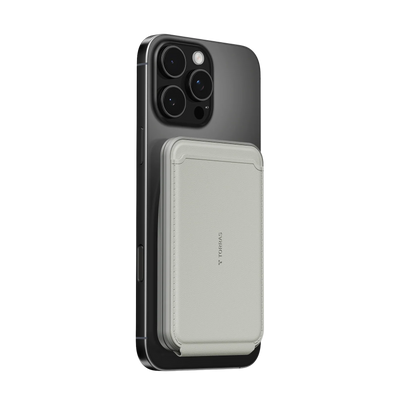


If you want a business travel phone setup that actually holds up on the road, start with the basics that fail first: battery, one-handed use, and cable clutter. The best setup stays slim enough for pocket carry and security bins, yet still makes calls, charging, and quick checks easy when you are moving from gate to hotel desk to rideshare.
Start With the Three Things That Fail on the Road
Battery drain shows up first on long travel days, especially when you are jumping between email, maps, boarding passes, and video calls. One-handed use is the next pain point, because a phone that feels fine at home can become awkward when you are standing in line, carrying coffee, or trying to answer a text in a car.
Cable clutter is the quiet problem that makes everything feel slower. If you need to dig for a cord every time you sit down, the setup is already working against you. A good executive travel setup should feel quick to grab, easy to set down, and slim enough that it does not become another thing to manage.

Build a Slim Case That Works All Day
For most travelers, the case is the part that affects the whole day. It should protect the phone without turning it into a brick in a blazer pocket or carry-on pouch. That matters more than extra features that only look useful on a product page.
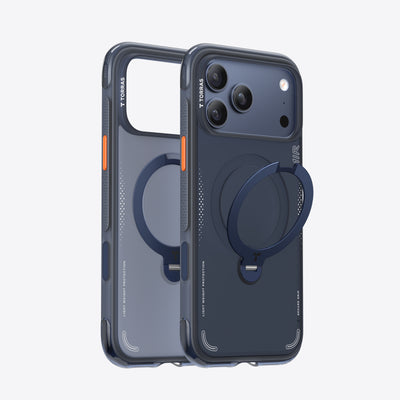
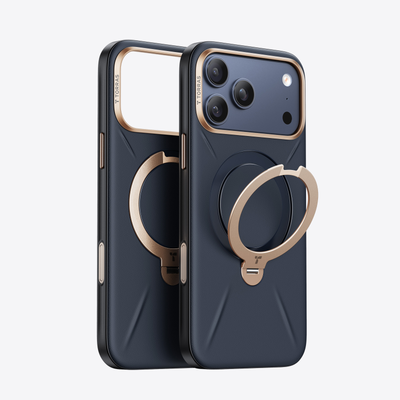
A built-in stand is worth caring about when you actually use the phone for short meetings, boarding pass checks, or note review in cramped spaces. In practice, a stand helps most when you do not want to hunt for a coffee cup, laptop, or folded napkin just to prop the screen up. TORRAS' Ostand Q3 Spin for iPhone 16 Pro Max is a relevant place to start if you want that stand-first travel setup, while the broader MagSafe Case collection is the easier browse path if you are checking fit across models.
Magnetic attachment matters most when you are charging in a lounge seat, a rideshare, or a small hotel desk. It is less about a dramatic performance gain and more about reducing the little annoyances that pile up when you are half-packed, half-working, and trying to move quickly. If you rarely use wireless charging or stands, this feature is nice, but not essential.

A low-profile case also tends to feel more natural with client-facing clothes than a thick rugged shell. That does not mean thin is always better. If you are rough on your phone or often work outdoors, more protection may matter more than pocket ease. But for most road warriors, a cleaner, flatter profile is the better daily compromise.
Choose Power for Flights, Lounges, and Late Calls
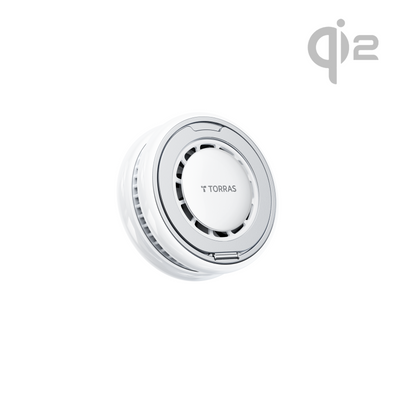
Power choices should follow the day you actually have, not the ideal one. If you spend time away from outlets, a magnetic power bank is the most convenient backup because it stays attached and keeps cords out of the way. If you expect one outlet to handle a phone, laptop, and earbuds, a compact wall charger is the more useful foundation. If the phone mainly sits on a desk or nightstand, a cooling wireless charger can keep the surface tidier.
| Travel Situation | Best Fit | Why It Helps | Main Drawback |
|---|---|---|---|
| Gate seating or rideshares | Magnetic power bank | Keeps charging attached and avoids cord tangles | Adds another battery to carry |
| Hotel desk or lounge outlet | Compact wall charger | Handles multiple devices from one outlet | Needs access to power |
| Nightstand or work desk | Cooling wireless charger | Keeps the phone organized while charging | Less portable than a power bank |
For flight days, treat battery rules as a separate check, not an assumption. TSA says portable chargers and power banks with lithium-ion batteries must go in carry-on bags, not checked luggage, and consumer power banks rated at 100Wh or less are generally permitted in carry-on under the agency's guidance on power banks and 100Wh lithium batteries. If you fly often, that rule alone is enough reason to keep your backup power compact and easy to reach.
The practical mistake is buying power for the "worst day" without thinking about where you will actually use it. A magnetic battery is handy when you are walking, waiting, or sitting in a car. A wall charger usually beats it once you are settled in a hotel room. If you only choose one, decide whether mobility or outlet access is the real bottleneck.
Set Up for Calls Between Gates and Meetings
Hands-free positioning matters most when you are on a tight schedule and need the screen to stay readable without babysitting it. A stable stand is more useful than a random prop because it keeps the phone upright in a gate seat, on a hotel desk, or beside a tray table during a quick client check-in. That is why a stand can feel small at first and still become the accessory you use most.
A built-in stand also helps when you want to glance at a calendar, join a short video call, or check a boarding pass without flattening the phone on a questionable surface. That is a convenience judgment, not a universal rule. If your trips are mostly text-only and you rarely set the phone down, the value is lower.
For readers who want a deeper look at why this matters on workdays, the stand case setup guide is a useful follow-up. It is most relevant if you frequently work from hotel rooms or crowded lounges where a clean viewing angle matters.
One-handed use matters just as much. When you are pulling the phone out for a rideshare code, a gate change, or a message before boarding, a slim case and a good grip feel better than a bulky shell. In real travel use, that small difference adds up because you are not always seated, steady, or free-handed.
Pack the Rest of the Setup Without Adding Bulk
Keep the rest of the kit simple. Cables, bricks, and backup power should pack flat and come out fast. If the bag turns into a tangle, you will feel that every time you rush through security or repack between meetings.
A compact organizer helps, but the bigger win is restraint. Bring the charger you will actually use, not the one that only looks prepared. If you already have a phone case with a stand, you do not need extra desk props. If you have a magnetic battery, you probably do not need a second layer of charging clutter in the same pocket.
The easiest way to judge your setup is to ask one question: can you move from gate to car to hotel room without rethinking where everything is? If the answer is no, the kit is too busy. Trim it until the phone is easy to grab, easy to charge, and easy to set down.
Related Resources
- Wireless charger collection
- Charging collection
- Best 25W Cooling Wireless Chargers in 2026: Ultimate Guide + TORRAS PolarCircle Review
- Q Stand vs O Stand Phone Cases: Which Shape Fits Your Lifestyle?
- Power Bank vs Wireless Charger: What Is the Difference and Which One You Actually Need
- Ostand Q3 Air Pro for iPhone 17 Pro
FAQ
Q1. What Should a Business Travel Phone Setup Include?
At minimum, it should include a slim protective case, a way to prop the phone up for hands-free viewing, a reliable charger, and a backup power option for long travel days. If you work from lounges or hotel rooms often, the stand and charging pieces matter more than extra cosmetic features.
Q2. How Do I Keep My Phone Charged on Long Travel Days?
Use a wall charger when you have outlet access, then add a power bank for time between gates, rides, or meetings. The smartest setup is usually the one that covers both modes: stationary charging at the hotel and portable charging when you are moving.
Q3. Why Does a Phone Case With a Stand Help on Business Trips?
A stand makes quick calls, calendar checks, and boarding pass viewing easier when you do not have a clean surface nearby. It is most useful in hotel rooms, lounge seats, and crowded desks where you would otherwise prop the phone on random objects.
Q4. Can a Magnetic Power Bank Replace a Wall Charger?
Not really. A magnetic power bank is better as backup power when you are away from outlets or moving between stops. A wall charger is still the better primary charger once you have a desk, nightstand, or lounge outlet available.
Q5. What Is the Best Way to Keep a Phone Setup Slim for Airports?
Choose low-bulk accessories, keep loose cables to a minimum, and avoid carrying chargers you rarely use. The best airport setup is the one that packs fast, fits easily in a pocket or pouch, and does not slow you down at security or boarding.
The Cleanest Setup Is the One You Barely Notice
A strong business travel phone setup does not feel fancy once the trip starts. It feels quiet, light, and dependable. If your case, charger, and backup power all work without extra fiddling, you spend less time managing gear and more time getting through the day. That is the real win on a busy trip: fewer interruptions, less bulk, and no battery panic.

 New
New


Becca Farsace
Emmy-winning filmmaker and creator Becca Farsace takes tech outside. A former senior video producer at The Verge, she has created and produced over 250 videos, becoming the first staffer to surpass 6.5 million views on TikTok. Now a full-time tech creator, she's built a go-to YouTube channel for adventurous, real-world tech reviews. Becca blends cinematic storytelling with a sharp strategic lens to help brands and audiences connect with technology in a more human, compelling way.