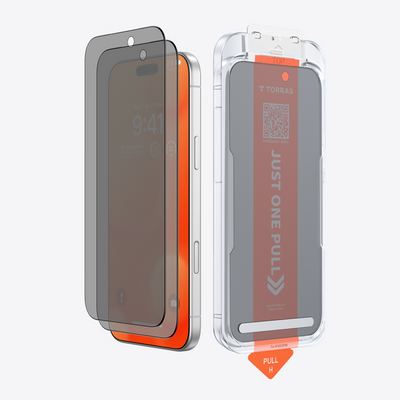
The best mobile gaming screen protector fits your exact phone model, leaves every part of the touch area and its edges usable with your case on, and gives you the scratch protection you want. Get those three right before thinking about finishes.
Clear, anti-glare, and privacy finishes each solve a different viewing problem. Pick one of them only if glare or people looking over your shoulder actually bother you during play.
Start with Exact Fit and Touch Access
A protector that is almost right for your phone can still get in the way of a game. Run these checks in order:
- Name your exact phone model and the case you plan to use. Match the full model name, such as "Pro" or "Pro Max," not just the series. Then confirm the listing's coverage, cutouts, and edge shape. For example, our OrigArmor for iPhone 18 Pro lists the iPhone 18 Pro and iPhone 18 Pro Max as compatible models. That tells you which phones it was made for. It does not tell you how it will sit with your particular case.
- Check where the case lip meets the protector. Edge swipes, corner buttons, and swipe-up gestures all happen right at that border. If the case pushes on the protector's edge or covers part of it, the fit is wrong for that combination.
- Play the way you usually do, one-handed. With the case on, try the same thumb reaches, taps, and edge swipes your game needs, like you would while holding a rail on a train. If an edge, an opening, or the case lip blocks an area you touch, treat that as a fit mismatch. Don't assume it will get better with use.
A clean install matters too, since dust and bubbles near the edges can lift the glass. Our guide on applying without bubbles covers the prep steps.
Balance Scratch Protection with Touch Feel
Scratch protection is a reasonable baseline, but treat maker statements—such as hardness ratings or scratch-resistance claims—as specific to that product. They do not prove drop protection or ensure your game will run or respond better.
Material labels don't tell you how a protector feels under your thumb either.
Tempered glass and film are built differently, and you can compare protector materials to see how coatings, durability, and case fit vary. For gaming, though, the deciding factors are still the exact product's fit, what it claims, and how it feels on your phone. A "glass" or "film" label alone won't settle the choice.
The real test happens over time. After a few days of pocket carry, tilt the screen toward a light and look for fine marks along the edges. During a long session, notice whether fingerprints and smudges build up where your thumbs rest, or whether the surface starts to feel draggy. Some protectors list anti-fingerprint or anti-smudge coatings. Whether that holds up for you depends on your hands, how you play, and how often you wipe the screen. If smudges keep pulling your eye during matches, put stain resistance higher on your list next time.
If you play on iPhone, our ultra-clear iPhone protectors are sorted by model. Galaxy players can check the Samsung tempered protector range the same way.
Choose a Finish for Your Viewing Conditions
Only pick a finish to fix a problem you actually notice. Reflections and side views are two separate problems, so the fixes can't be swapped for each other.

Clear for an Unobstructed View
Clear is the default when reflections don't keep bothering you. It keeps the screen looking close to how you're used to seeing it. That suits most indoor play and players who care about crisp game graphics. Clear protectors still differ in clarity and touch feel, so judge the one you actually buy on your own display.
Matte or Anti-Glare When Reflections Recur
Think of a phone in a car mount while you're parked, or a game played next to a sunny window. If your own reflection or a lamp keeps showing up on the screen at that angle, anti-glare is worth a look. Corning explains that on its treated glass, tiny surface structures mean anti-glare scatters incoming light in different directions. The light still reflects, but your eye doesn't see a sharp mirror image.
Lighting matters as much as the finish. In a Corning profile, one gamer positions lamps to avoid glare and checks for anti-glare or anti-reflective treatments when he picks equipment. That's one person's habit, but it's easy to copy: move the light or yourself first, and see whether the reflection goes away.
There is a tradeoff. Corning's technical paper notes that some anti-glare textures can reduce contrast on display cover plates. This "washout" looks like a hazy reflection under ambient light. If dark game scenes start to look flat, the anti-glare finish may be costing you more than the glare did.
Privacy When Side Views Matter
A privacy finish is for a different problem: people next to you on a bus or train seeing your screen. 3M describes its Black Privacy Products, which include smartphone options, as giving a black-out view from side angles while the person in front still sees the content. That describes 3M's own product family on its Canadian site. Other privacy protectors may not behave the same way.
Pick privacy only if side views are a real concern. It won't stop glare. If you mostly play alone at home, it may not be worth it. For a fuller breakdown of privacy versus regular protectors, including viewing angles and brightness, see our comparison.
FAQs
Is tempered glass better than film for mobile gaming?
Neither material wins for every gamer. A glass or film label won't tell you how a specific protector fits your model, works with your case, or feels during edge swipes. Compare the exact products on those points and on what each maker claims about scratch resistance.
Do matte and privacy protectors solve the same problem?
No. Matte or anti-glare targets reflections on the screen. Privacy targets people viewing from the side. To figure out which one you need, notice what distracts you during a typical session: your own reflection, or someone glancing at your screen.
What should I do if touch feels inconsistent after installing a protector?
For iPhone and iPad, Apple's troubleshooting steps for a screen that responds intermittently include restarting, cleaning the screen of debris or water, unplugging accessories, and removing any case or screen protector. If touch works normally once the protector is off, recheck the fit and the install before putting a new one on.
Does a curved-edge protector matter for edge swipes?
It can, because edge gestures happen where the protector and case meet. Whatever the edge shape, test your game's edge swipes with the case on. If the border feels raised or a swipe misses, that combination isn't a good fit.

 New