

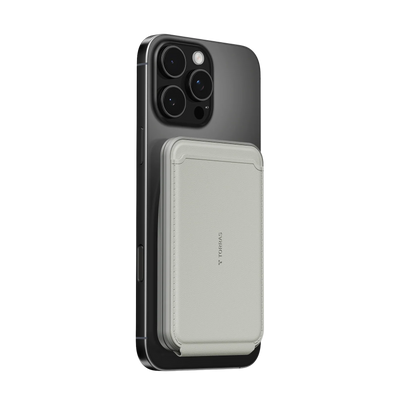


Wireless power banks have evolved into sophisticated 2026 charging hubs built around the Qi2 standard, delivering reliable magnetic attachment and faster speeds for iPhone and compatible Android users. Mastery comes down to understanding thermal behavior, achieving consistent alignment, and treating the power bank as a smart docking tool rather than a set-it-and-forget-it battery. When used with awareness of heat buildup and your specific phone case, these devices preserve long-term battery health while supporting cable-free workflows during commutes, cafe sessions, and travel.

Getting Started: The 2026 Standard for Magnetic Alignment
The shift to Qi2 in 2026 marks a major step forward from earlier wireless standards. As the Wireless Power Consortium's Qi2 25W announcement details, this universal specification now supports up to 25W across certified devices, matching many proprietary fast-charging peaks while adding magnetic alignment for everyone. This makes Qi2 the practical standard for new power banks rather than legacy Qi 1.2 models that often delivered inconsistent 5W to 15W rates.
Magnetic alignment serves as the real unlock. Without it, even a well-placed charger can lose 15-20% efficiency through misalignment, turning more energy into heat instead of battery charge. Qi2-certified power banks use a ring of magnets that snap your phone into the optimal position automatically, which feels noticeably more secure whether you are reading on a train or checking maps one-handed.
For context on how this differs from older approaches, see our guide on MagSafe vs Standard Wireless Charging: What Is Actually Different. Legacy magnetic-compatible banks still work, but Qi2 hardware brings better cross-platform support and higher sustained speeds for 2026 phones. Android users on devices like the Galaxy S series gain these benefits through Qi2 Ready certified cases, which add the necessary magnets without requiring built-in hardware.
Mastering the Snap: How to Ensure Perfect Magnetic Alignment
A solid magnetic connection should produce a distinct click and hold the phone firmly enough for one-handed use on a crowded bus or while walking. If it feels loose or the charging indicator flickers, reposition until the snap feels decisive. In real commutes, this secure lock prevents the phone from shifting in your pocket or bag and interrupting the session.
Android owners benefit greatly from Qi2 Ready cases, which enable the same magnetic experience on non-MagSafe phones. These cases must be thin—ideally under 3.5 mm total thickness including any raised edges—to avoid weakening the field or trapping heat. Thicker rugged cases often reduce speeds noticeably even when the magnets connect, so test your specific combination before relying on it for a full workday.
A quick self-check helps: after snapping on, watch the phone's charging animation or battery percentage for the first two minutes. Steady climbing at 10W or higher confirms good alignment. If it starts at 5W or drops quickly, adjust or remove your case for that session.
Efficiency First: Optimizing Your Wireless Charging Speeds
Wireless charging will almost always feel slower than a wired wall plug because of conversion losses. Magnetic alignment improves the picture, typically reaching 80-85% efficiency compared with misaligned standard Qi setups that hover closer to 70%. This difference shows up as both faster top-ups and less warmth in your hand during a morning commute.
Modern phones intentionally slow charging once the battery hits around 80% to protect long-term health. This smart downshift is normal behavior, not a sign that your power bank has failed. In practice, expect the fastest rates during the first 50% of a charge cycle, then a gradual taper that feels more pronounced on wireless than wired.
For pocket carry during transit, keep the power bank and phone centered and avoid letting them shift. Vibration from trains or walking can trigger minor misalignment that drops you from 15W to 7.5W without warning. A slim model with a strong magnet minimizes this drift, letting you pull the phone out later with a healthy charge remaining.
The Digital Nomad Workflow: Using Passthrough and Multi-Device Modes
Many digital nomads now treat a wireless power bank as a temporary desk dock rather than just emergency juice. Models with a built-in kickstand, such as the MiniMag Ostand Power Bank 10k mAh, let you prop the phone vertically in StandBy mode while it charges. The upright angle improves airflow across the back, keeping temperatures noticeably lower than flat placement on a cafe table.
Passthrough charging—plugging the power bank into a wall brick while your phone charges wirelessly from it—creates a stable mobile office setup. Use a 30W or higher PD charger for best results; lower wattage bricks often force the bank to split power inefficiently and run warmer. This approach saves cycles on your phone's internal battery during long work sessions, though it does add some extra heat to the power bank itself.
Multi-device charging works well for travelers carrying earbuds or a smartwatch. Many 2026 magnetic banks include secondary coils or passthrough ports that let you charge your phone on the main pad while topping up AirPods or an Apple Watch simultaneously. Keep each device centered on its coil and avoid stacking thick cases or metal accessories that could confuse the foreign object detection system. For extended trips, our guides to The Best Slim Power Banks for Travel and Everyday Carry and Best Power Bank for Backpacking in 2025 highlight capacities and features that balance weight with real-world runtime.
Troubleshooting Heat and Slow Charging: The Pro Diagnostic Guide
Wireless power banks naturally run warmer than wired chargers because some energy converts to heat during transfer. A mild warmth after 15-20 minutes of use is usually normal, especially in a sunny car mount or during active use like navigation. However, if the bank or phone feels uncomfortably hot to the touch—approaching the point where you instinctively pull your hand away—stop and switch to a wired connection.
This diagnostic view helps separate normal efficiency behavior from problems that need attention.
The most common culprit for sudden slowdowns or repeated disconnects is foreign object detection. Samsung's wireless charging support page explains that metal objects, RFID cards, or even thick wallet cases between the devices can trigger safety pauses. Remove credit cards from your phone case before snapping on the power bank, and avoid placing the setup on a metal tray table in a plane.
Sunlight or a hot car interior can push surface temperatures past the phone's comfort zone quickly, causing it to throttle to 5W or stop entirely. In these cases, move to shade or use a wired cable for that session. Many users also mistake the intentional 80% software cap for a hardware problem—check your phone's battery settings to see if optimized charging is enabled.
Safety and Maintenance: Protecting Your Long-Term Battery Health
Heat remains the primary factor that shortens smartphone battery lifespan. Apple's official guidance notes that charging or using a device in ambient temperatures above 95°F (35°C) accelerates chemical aging inside the battery. In everyday terms, this means keeping your wireless sessions cool adds measurable months or even years before you notice meaningful capacity loss.

Using passthrough mode thoughtfully helps the power bank's own cells too. Recharging it separately when possible reduces the stress of constant simultaneous input and output. For storage between long trips, aim to keep the bank around 50% charge in a cool drawer rather than fully charged or empty—this single habit noticeably slows self-discharge and internal wear over time.
After a year of heavy travel use, check your phone's built-in battery health metric. If it has dropped faster than expected, reflect on how often you charged while the device was running processor-intensive apps or in warm environments. Small adjustments like favoring vertical docking and switching to wired for heavy days often make a real difference.
Future-Proofing Your Portable Power Setup
Your next wireless power bank should be a 10,000 mAh Qi2 hub that supports at least 15W magnetic output and includes both wireless and USB-C PD ports for flexibility. Look for models with visible temperature management features such as aluminum shells or graphene layers, as these tend to stay more comfortable during extended use.
The industry is moving toward active cooling accessories and smarter thermal sensors that adjust power dynamically. In the meantime, prioritize vertical docking over flat placement in every workflow—it consistently delivers better real-world temperatures and allows the phone to run productivity modes without fighting trapped heat.
For current recommendations that match these criteria, review our updated list of the Best Branded Power Bank for iPhone [2025 Updated List]. Browse the full power bank or Wireless Charger collections to find Qi2-compatible options suited to your typical travel and daily carry needs.
Does My Phone Case Block Wireless Charging With A Qi2 Power Bank?
Thick cases over 3.5 mm often reduce magnetic strength and trap heat even when the snap feels secure. Test by timing how long it takes to gain 20% charge with and without the case. If speeds drop significantly or the phone warms more than usual, consider a thinner Qi2 Ready case or remove the case for important charging sessions. Material matters too—metal or very dense composites interfere more than slim TPU.
How Do I Use Passthrough Charging Safely On A Wireless Power Bank?
Connect a 30W or higher PD wall charger to the power bank's input port first, then snap your phone on wirelessly. Monitor temperatures for the first 10 minutes; if either device exceeds mild warmth, reduce the load by closing background apps or switching the phone to wired. Use passthrough occasionally for desk sessions rather than daily to limit cumulative heat stress on both batteries.
Why Does My Wireless Power Bank Get Hot During Use?
Some heat is inevitable from energy conversion losses, but excessive warmth usually stems from misalignment, thick cases, direct sunlight, or charging while running GPS or video. Move to a cooler spot, recenter the devices for a stronger magnetic lock, or switch to a USB-C cable. Persistent high heat after these adjustments suggests checking for foreign objects or considering a model with better thermal materials.
Can I Charge My Airpods Or Apple Watch With A Magnetic Power Bank?
Yes, many 2026 models include secondary charging areas or passthrough ports that support earbuds and watches when properly centered. Place the smaller device flat against the designated zone and avoid overlapping with the main phone pad. Expect slower rates than dedicated chargers, and watch combined heat output—limit simultaneous multi-device sessions to under an hour in warm environments.
What Temperature Should My Wireless Power Bank Stay Below?
Aim to keep both the bank and phone below 95°F (35°C) during charging. If either feels hotter than a fresh cup of coffee, pause and let them cool or switch to wired. This threshold aligns with manufacturer guidance for minimizing long-term battery wear. Use your hand as a practical gauge after 15 minutes of use and adjust habits accordingly.
How Should I Store A Wireless Power Bank For Long Trips?
Store at approximately 50% charge in a cool, dry place rather than fully charged or depleted. This reduces internal stress and self-discharge over weeks or months. Before a big journey, top it up to 80% and run a quick alignment test with your phone to confirm everything still performs as expected after storage.

 New
New


Becca Farsace
Emmy-winning filmmaker and creator Becca Farsace takes tech outside. A former senior video producer at The Verge, she has created and produced over 250 videos, becoming the first staffer to surpass 6.5 million views on TikTok. Now a full-time tech creator, she's built a go-to YouTube channel for adventurous, real-world tech reviews. Becca blends cinematic storytelling with a sharp strategic lens to help brands and audiences connect with technology in a more human, compelling way.