
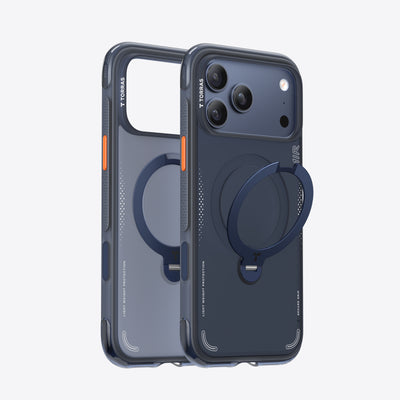
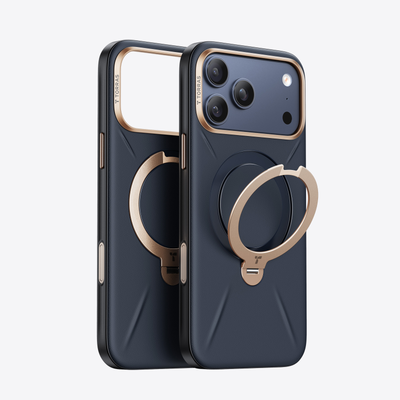

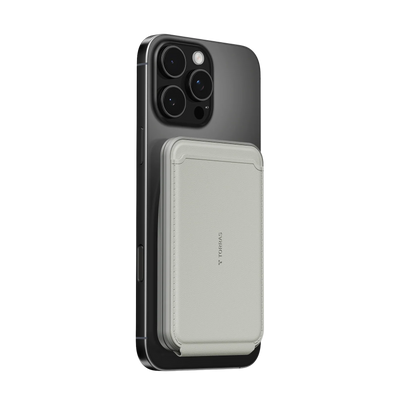


A good iPhone Apple Watch charging setup should make the nightstand feel calmer, not more crowded. If you want StandBy on the iPhone and a separate Apple Watch charger beside the bed, a stand case can be the simplest way to keep the phone upright without adding another bulky accessory.

What a Clean Bedside Setup Actually Needs
The bedside setups people keep using are usually the ones that are easy to live with half-asleep. You want the phone visible, the watch charging, and the cable path simple enough that you do not knock something loose when you reach for water or silence an alarm.
Apple's StandBy mode only really behaves like a bedside display when the iPhone is locked, charging, and set down sideways in a stationary position. That matters because a tidy nightstand is not just about looks. If the phone is flat, too low, or easy to bump, StandBy is more likely to be frustrating than useful.
On a small table, the real goal is space discipline. Leave room for the watch puck, a lamp, and a glass of water. If a setup forces every item to touch the next one, it tends to feel messy fast, even when the cables are technically neat.
For a broader cleanup pass, How to Organize Your Nightstand Charging Setup: A Minimal Guide to Fewer Cables and Better Sleep is a useful follow-up if you are trying to reduce cable clutter beyond just this one corner of the room.
Why a Stand Case Works Well at the Bedside
A stand case earns its keep when you want the phone to do two jobs at once. It protects the phone in daily use, then becomes the thing that props the screen up at night. That is a lot easier to live with than carrying a separate desk stand from room to room.
For most people, the upside is not dramatic. It is practical. A built-in stand can keep the iPhone upright for StandBy viewing while leaving the rest of the nightstand free for the Apple Watch charger and the small things that always end up there.
The best fit is a bedside routine that also has daytime use. If you watch videos at your desk, glance at timers in the kitchen, or want a case that is less annoying to carry than a separate stand, the stand case makes more sense. If the phone only ever sits on one dresser and never moves, a dedicated stand can still be fine.
For readers who want more of the hands-free case angle, 6 Reasons to Use a Phone Case with a Kickstand is a quick way to see why the format is useful beyond the bedroom. The more shopping-focused version is Best Phone Case with Stand of 2025, which is a better next stop if you are comparing stand-case styles.

For bedside use, the main advantage is that you are not creating a second object whose only job is to prop up a phone. That sounds minor until you try it on a narrow nightstand. The difference is usually the gap between a setup that feels intentional and one that starts to sprawl.
How the Apple Watch and iPhone Fit Together
The cleanest iPhone Apple Watch charging setup is the one where each device has a clear job and a clear landing spot. The iPhone should be the visible display. The Apple Watch should have its own charger path. If you let the two fight for the same corner of the nightstand, the cables start to tangle and the phone becomes the thing that shifts when you reach in the dark.
Apple's MagSafe guidance is helpful here because magnetic alignment makes it easier to keep the iPhone where you placed it. In practice, that means less fiddling when you dock the phone at night and fewer small adjustments in the morning.
The watch side is different. Apple's MagSafe Duo Charger documentation shows the basic idea of charging iPhone and Apple Watch together, but a bedside setup does not need a two-device charger to be tidy. It just needs enough separation that the watch cable does not drag the phone around.
A simple rule helps: place the phone where you can read it from bed without touching it, then route the watch charger so it does not cross your hand path. If you need to unplug in a hurry every morning, this matters more than symmetrical placement.
The watch side also has a separate friction point. If the puck sits too close to the phone stand, the cable tends to crowd the same corner. A few inches of breathing room often makes the whole setup feel better, even if it is not visually perfect.
For people who want a cleaner charging workflow, the Apple Watch charger tips guide is worth opening after this section. It is especially useful if your current problem is cable clutter rather than device count.
Where the TORRAS Ostand Fits In
The TORRAS stand case fits best when you want one case to do the standing job that would otherwise require a separate accessory. That is why it makes sense in a bedside setup, especially when the table also has to hold a lamp, a watch charger, and maybe a book or a glass of water.
- It can replace a separate phone stand when the iPhone needs to stay upright overnight.
- It keeps the bedside footprint smaller when space is tight.
- It is easier to carry during the day than a desk stand.
- It works well for people who want a cleaner look without building a dedicated charging station.
If you want a direct shopping path, Ostand Q3 Spin for iPhone 16 Pro Max is the relevant product page to check. Because the fact pack here is limited, treat it as a check-before-buying option and confirm the exact model fit before you add it to cart.
The main reason this format helps at night is simple: it reduces the number of objects that have to live on the nightstand. A case that stays on the phone all day is easier to tolerate than a stand that only makes sense when you are asleep.
If you want to see the broader MagSafe setup logic behind that decision, How to Build a Complete MagSafe Accessories Setup That Actually Works Together is a good companion read. It is more useful than browsing random accessories and hoping they all cooperate.
Small Checks Before You Settle In
Before you trust the setup every night, test it in the same position you actually sleep in. If you cannot read the screen from your pillow without nudging the phone, the angle is wrong. If the Apple Watch cable crosses the path you use to get in and out of bed, the layout is too cramped.
A quick readiness check looks like this:
- Lock the iPhone and confirm StandBy appears while charging.
- Make sure the phone stays upright on its own instead of slowly sagging.
- Reach for the watch charger and see whether the cable tugs the phone.
- Leave room for the things that always end up on the nightstand.
That last point matters more than people expect. A setup can look tidy in a photo and still be annoying in daily use if there is nowhere to put glasses, keys, or a water bottle.
If your bedside table is already crowded, a stand case is usually the better fit than adding another free-standing phone stand. If your surface is roomy and you want the most adjustable angle possible, a separate stand can still make sense. The right choice depends on whether you care more about flexibility or reducing clutter.
Related Resources
Explore these focused reads and collections to refine your setup further:
- Phone Case collection
- Q3 Air Series collection
- Magsafe Wallet collection
- Qi2 Wireless Charging Standards Explained
FAQs
Q1. Can a Stand Case Replace a Separate Bedside Stand?
Usually, yes, if your goal is to keep the iPhone upright for StandBy and you do not need a heavy-duty desktop stand. A stand case is often enough for overnight use, but a dedicated stand still wins if you want more angle control or use the phone on the same surface all day.
Q2. How Do I Keep My iPhone Upright Overnight Without Extra Bulk?
Use a case with a built-in stand and place the phone where it stays stable while charging. The key is not just the case, but the surface around it. If the phone sits near the edge of a crowded table, even a good stand can feel awkward fast.
Q3. What Is the Cleanest Way to Charge an Apple Watch Next to an iPhone?
Keep the watch charger on its own side of the nightstand and avoid letting the cable run through the same space as the phone stand. The cleanest setup is usually the one with the fewest crossing cables, not the one with the most accessories.
Q4. Why Does Magnetic Alignment Matter at Night?
It helps the iPhone stay placed where you put it, which is useful when you want StandBy to stay consistent overnight. That does not solve every charging problem, but it does reduce the small shifts that make a bedside setup feel fussy in the morning.
Q5. Can I Use a MagSafe Wallet or Power Bank With This Setup?
Yes, but only if the bedside layout still feels stable. A wallet or power bank is fine for daily carry, yet it can make a nightstand setup more crowded if you leave it attached all night. At bedtime, the simpler arrangement usually works better.
The Setup Worth Keeping
The best iPhone Apple Watch charging setup is the one you do not have to think about every night. If the phone stays readable, the watch charges cleanly, and the table still has room for real life, you are close. A stand case is worth considering when you want that balance without adding another bulky object to the nightstand.

 New
New


Becca Farsace
Emmy-winning filmmaker and creator Becca Farsace takes tech outside. A former senior video producer at The Verge, she has created and produced over 250 videos, becoming the first staffer to surpass 6.5 million views on TikTok. Now a full-time tech creator, she's built a go-to YouTube channel for adventurous, real-world tech reviews. Becca blends cinematic storytelling with a sharp strategic lens to help brands and audiences connect with technology in a more human, compelling way.