
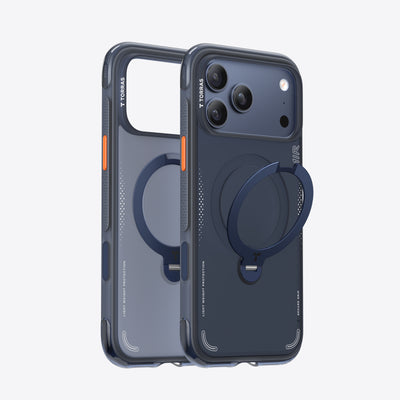
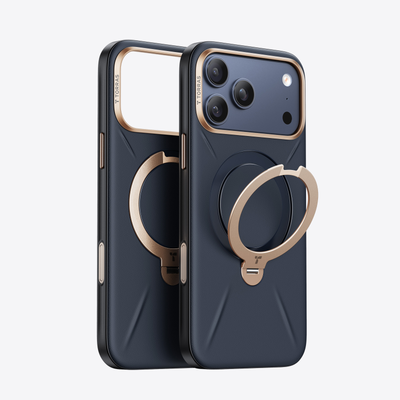

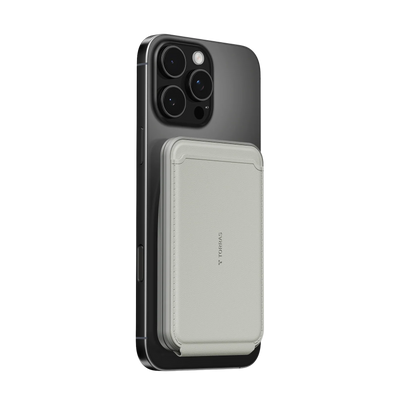


Holding your phone is fine until you need both hands. A phone case with stand solves that problem without adding any extra steps to how you already carry your phone. The stand is built in, always there, and ready to use in seconds. No separate accessories, no searching for something to prop the phone against. Just a case that does more than protect.
What You Are Actually Giving Up Without a Built-In Stand
Most people do not think about what they are losing until they need a free hand and do not have one. The absence of a stand shows up in small, repeated moments throughout the day.
- Following a recipe while cooking with both hands occupied
- Taking a video call while typing or writing notes at the same time
- Watching a workout tutorial without holding the phone between sets
- Reading directions while eating or doing something else at the table
- Leaning the phone against a mug or book, only for it to slide flat within minutes
Each of these is a moment where holding the phone actively gets in the way. A hands-free phone case turns those interruptions into non-events, and propping the phone against random objects may work once in a while, but the angle and stability are hard to control.

Daily Scenarios Where a Hands-Free Phone Case Makes the Biggest Difference
A phone case with stand is most valuable in the situations you encounter every day, not just the occasional edge case. These are the three contexts where hands-free functionality changes how a task actually feels.
At a Desk or Workstation
A desk is where most people spend the most time with their phone nearby. Propping the screen at eye level while working reduces the need to constantly pick up and put down the phone between tasks. Video calls, reference material, timers, and music controls all become easier to manage when the phone stands on its own at a stable angle.
For anyone who works with a laptop and a phone at the same time, a reliable stand reduces the friction of switching attention between the two.
In the Kitchen and Around the House
The kitchen is one of the most consistently useful environments for a built-in stand. Following a recipe step by step, watching a cooking video, or timing multiple things at once all benefit from a phone that stays upright without being held.
The same logic applies to other home tasks: folding laundry while watching something, following an exercise routine in a living room, or keeping a video call going while doing light housework.
During Travel and Commuting
On a plane, train, or at an airport, surfaces for propping a phone are inconsistent and sometimes unavailable. A built-in stand creates a reliable viewing setup on a tray table, a seat-back surface, or a café counter without needing anything extra.
For commuters, the stand is useful whenever both hands are occupied with a bag, a coffee, or simply holding on.

What to Look for in a Phone Case with Stand
Not every built-in stand phone case performs at the same level. The stand mechanism, the magnetic system, and the overall protection design all affect how useful the case is across the scenarios above.
Stand Angle Range and Locking Stability
A stand that only holds one angle is limiting. The ideal range covers both portrait (vertical) and landscape (horizontal) orientations with multiple locking positions in each. Locking stability matters especially on surfaces that are not perfectly flat, where a friction-only stand will drift or collapse under slight pressure.
A stand that clicks into defined positions holds up on a vibrating tray table or a slightly uneven desk surface in a way that a tension-based design simply does not.
For a stand that holds across all of these situations, a case like Ostand Q3 Air Pro fits this kind of hands-free setup because it combines a 360° rotating stand, magnetic support, and upgraded cushioning in one design.
Magnetic Strength and MagSafe Compatibility
MagSafe (Apple's magnetic alignment and attachment system built into iPhone) compatibility affects how reliably the case works with wireless chargers, magnetic mounts, and accessories. A stronger magnetic system helps improve alignment and makes magnetic charging or mounting feel more stable.
For a hands-free phone case used across multiple surfaces and scenarios, an 18N magnetic hold (a measurement of magnetic force, where higher values indicate stronger attachment) provides the level of grip needed for secure attachment without requiring physical latches or clips.
Protection Level for a Case You Use in More Positions
A hands-free case gets handled differently than a standard case. It is set down more often, at more angles, on more surfaces. That means the protection needs to account for drops from table height as well as from hand height, and for edge and corner impacts from a wider variety of orientations.
The table below summarizes the key protection features to check before choosing a built-in stand phone case. A case that covers all four points handles the full range of hands-free use without gaps.
| Protection Feature | Why It Matters for Hands-Free Use |
| Corner airbags | Absorbs impact when the case is knocked off a surface |
| Raised screen edge | Protects the display when the phone lands face-down |
| Reinforced back panel | Resists surface scratches across repeated flat placement |
| Side grip texture | Reduces slip when picking up or repositioning the phone |
The more positions a phone is used in, the more directions a drop can come from. The Ostand Q3 Air Pro for iPhone 17 Pro addresses this with the Air² Pro Tech™ system (a dual-layer structure that absorbs, guides, and redistributes impact force in stages), covering edge and corner impacts across the full range of hands-free use positions.
How Built-In Stand Design Affects Long-Term Performance
Choosing a hands-free phone case is also a decision about how well the stand holds up over months of daily use. Two things determine whether the stand is still working properly a year from now.
- The hinge needs to handle daily wear. A stand that gets opened and closed multiple times a day accumulates wear faster than any other part of the case. Look for a stand mechanism designed for repeated daily opening and closing, with stable resistance and clear angle control. A durable hinge helps the stand keep its angle through repeated daily use.
- Flush design matters more than you think. A well-built stand sits flat against the case back when not in use. That keeps the overall profile close to a standard case and avoids the pressure point in your pocket that a protruding stand creates. If the stand sticks out noticeably when folded, the case will feel bulkier than it needs to be every time you are not actively using the stand feature.

Get More From Your Phone Without Holding It
A phone case with stand is one of the simplest upgrades available for how you use your phone every day. The right built-in stand phone case handles video calls, cooking sessions, travel, and desk work without asking you to change your habits or carry anything extra. Focus on angle range, locking stability, and protection depth, and the case will earn its place in every scenario that used to require a free hand.
FAQs
Q1. Is a Hands-Free Phone Case the Same as a Kickstand Case?
The terms are often used interchangeably, but they can describe slightly different designs. A kickstand case typically uses a flat panel that props the phone at a fixed angle, while a hands-free phone case with a ring or rotating stand offers a wider range of angles and orientations. Both allow hands-free viewing, but rotating stand designs generally offer more flexibility across portrait and landscape use.
Q2. Can a Hands-Free Phone Case Stand Hold the Phone in Both Portrait and Landscape?
Most quality built-in stand phone cases support both orientations, but the angle range in each direction varies by design. Rotating ring stands usually offer more flexibility than fixed kickstands because they support both portrait and landscape viewing. If multi-angle use matters, check the listed angle range on the product page before buying.
Q3. Does a Built-In Stand Make a Phone Case Bulkier?
A built-in stand adds some thickness, but modern designs minimize the impact by keeping the stand flush with the case back when folded. The difference in pocket profile compared to a standard case is usually small enough that most users adjust within a day or two. Cases with a protruding stand when folded tend to feel bulkier, so checking how the stand sits when closed is a useful step before committing to a specific model.
Q4. How Do I Know if a Built-In Stand Is Strong Enough for Daily Use?
Look for durability testing data from the manufacturer, specifically the number of open and close cycles the stand has been tested to withstand. A stand rated for 30,000 cycles reflects years of realistic daily use. Beyond the number, a stand that locks at defined angles rather than relying on friction alone will hold its position more consistently over time and across different surfaces.

 New
New


TORRAS Bot
The TORRAS Pebble Power Bank offers a balanced combination of portability, design quality, and dependable charging performance. Its unique pebble-inspired shape distinguishes it from traditional power banks while improving everyday usability.