
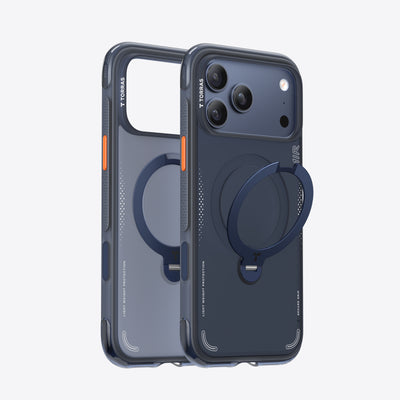
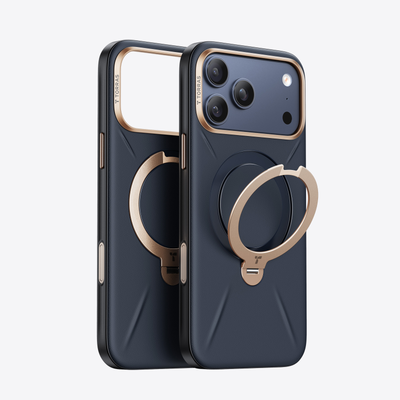

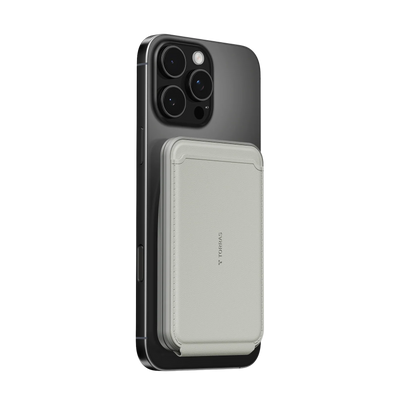


Samsung users who want a magnetic charger for Samsung usually need one thing first: a case that makes alignment feel dependable. A TORRAS Stand Case is the practical bridge when you want MagSafe-style convenience for charging, car mounts, and quick stand use without pretending Samsung has native MagSafe support.

Why a Stand Case Changes Samsung Charging
Samsung Galaxy phones can work with third-party wireless chargers, but the phone itself does not come with native magnetic alignment. Samsung's own guidance on third-party wireless charger compatibility and the Qi2 magnetic attachment standard point to the same practical takeaway: if you want the charger, wallet, or mount to stay put more reliably, the case matters as much as the charger.
A stand case changes the day-to-day experience because it solves two problems at once. It gives you a magnetic back for accessories, and it adds a built-in kickstand for video calls, streaming, and desk use. A plain magnetic ring accessory can help with mounting, but it does not add the same everyday convenience when the phone is off the charger.
For most Samsung owners, the best setup starts with alignment, then adds accessories only if they fit your routine. If you only want wireless charging, a simpler case may be enough. If you want one-handed placement, a car mount, and a stand for tabletop use, the stand case earns its place.
What a Strong Magnetic Setup Needs
A strong Samsung magnetic setup does not need to be complicated. It needs to feel steady in the places you already use your phone, and it needs to stay comfortable enough that you do not regret the extra bulk later.

Case Alignment and Magnetic Hold
The case should center the phone well enough that a charger or mount does not feel fussy when you place it down in a hurry. That matters most in the car, on a desk, or when you are trying to dock the phone one-handed while walking into work.
The real check is simple. If the phone slides around too easily, you will notice it every time you try to charge or mount it. If the magnet feels confident without making the phone awkward in hand, the setup is doing its job.
Charging Accessories That Stay Put
Qi wireless charging is still the base layer here. As Samsung notes in its wireless charging guidance, metal or magnetic materials between the phone and charger can reduce efficiency or cause problems. That is why the cleanest setup usually keeps the magnetic path simple and centered.
What this means in practice is that the charger should attach cleanly, not just look compatible on paper. When the phone is perched beside a laptop or tossed onto a desk between meetings, a stable hold matters more than a flashy spec sheet.
Mounts, Wallets, and Pocket Carry
A magnetic phone setup only feels good if it still works in your pocket. If the case feels too thick, catches on fabric, or adds enough bulk that you start leaving the phone on the table instead of carrying it, the setup has gone too far.
That is where the TORRAS Stand Case has an advantage over a magnet ring add-on. The stand gives the case a second job, so the extra material feels easier to justify. If you do not carry cards, skip the wallet for now. A slimmer stack is usually easier to live with during commutes and errands.
The TORRAS Stand Case Advantage
The TORRAS Stand Case works well as a bridge because it is useful even when you are not charging. That matters more than people expect. A lot of magnetic accessories feel clever for a week, then start feeling like clutter. A good stand case avoids that because the kickstand gets used every day.
If you are already looking at TORRAS case options, browse the Samsung Case collection for fit and finish. The key question is not whether the case has magnets. It is whether the case still feels comfortable in your hand, slips into a pocket cleanly, and keeps accessory placement predictable.
The best-case scenario for a stand case is a user who commutes, mounts the phone in a car, and uses the stand for calls or video while at a desk. If that sounds like your day, the stand is not a gimmick. It is the part that keeps the case from feeling like just another magnetic shell.
Build the Setup Around Your Day
-
Start with the case, because that is what decides whether the magnetic connection feels centered and dependable. If the case is the wrong fit, every accessory you buy after that feels worse.
-
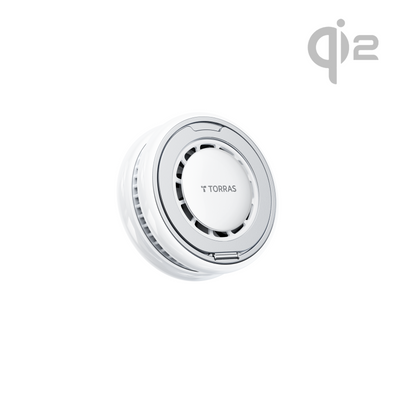
Choose the charger or power bank based on where you spend the most time. For desk charging, look at Qi2 options with cooling. For short trips and commute top-ups, a magnetic battery pack keeps the phone ready without hunting for a wall plug.
-
Add a wallet only if you actually carry cards. A wallet can be convenient, but it also adds another layer to the stack. If your phone already feels full in a pocket or car cradle, keep the setup simpler.
-
Test the phone in the places you use it most. In a car mount, the phone should lock in without a second try. On a desk, it should settle cleanly instead of slipping. In your hand, it should still feel easy to text, tap maps, and move around with one hand.
The point of a magnetic charger for Samsung setup is not to pile on accessories. It is to build a stack that disappears into your routine. If one part of the stack makes daily use feel fussy, remove it before adding something else.
| Scenario | Bare phone | Standard case | TORRAS Stand Case | Case with metal plate / magnetic accessory |
|---|---|---|---|---|
| Qi charging | Good | Good | Good | Fair |
| Magnetic alignment | Fair | Fair | Good | Fair |
| Pocket carry | Fair | Good | Good | Good |
| Car mount use | Fair | Fair | Good | Poor |
Common Fit Checks Before You Buy
| Check | Why It Matters | What To Look For |
|---|---|---|
| Case thickness | Thicker cases can make the magnetic connection feel less clean and more annoying to align. | A slim case that still feels secure in hand. |
| Magnetic feel | A weak or slippery hold becomes obvious the first time you mount the phone one-handed. | A centered attachment that does not need repeated repositioning. |
| Stand comfort | A stand that catches on fabric or feels awkward in hand stops being useful fast. | A stand that opens easily and stays out of the way when closed. |
| Charging placement | Poor placement is what turns wireless charging into a "why is this not working?" moment. | Clean alignment on a desk, in a car mount, and beside a laptop. |
| Pocket carry | Extra bulk is easy to ignore in a product photo and hard to ignore after a full day out. | A setup that still slides into a pocket without snagging. |
If you are deciding between a magnetic case and a magnetic accessory bundle, this is the shortest useful filter: keep the case if it improves both alignment and daily handling. Skip the extra add-ons if they make the phone feel bulky or awkward.
Final Setup Checks for Everyday Use
-
Test the setup in the car, at your desk, and in your hand before you assume it is "done." The places you use the phone most are the ones that expose weak magnets and awkward stand behavior.
-
Make sure the stand opens easily and does not make texting or map use feel clumsy. If it gets in the way more than it helps, you will stop using it.
-
Keep the stack simple at first. If the base case and charger feel good, then add a wallet or power bank only if you still have a real need for it.
-
If you want a broader browse path after narrowing the case choice, the phone accessories collection is a useful starting point. For a more complete setup walkthrough, see the guide on building a complete MagSafe accessories setup.
Related Resources
- How Magnetic Phone Case Work: Everything You Need to Know
- What Is Qi Wireless Charging?
- Qi2 Wireless Charging Standards Explained
- Best Wireless Charger for Samsung Galaxy Phones: TORRAS PolarCircle Qi2 (2026)
FAQs
Q1. How Do I Make a Samsung Phone Work With MagSafe-Style Accessories?
You need a magnetic case or stand case that creates the attachment surface first. After that, chargers, wallets, and power banks can connect more predictably. The main thing to check is whether the case keeps the accessory centered instead of letting it drift.
Q2. What Is the Best Magnetic Charger for Samsung Commuting?
The best commuting setup is usually the one that stays aligned easily in a car mount and still feels quick to attach with one hand. A magnetic wireless charger or magnetic power bank is the right class to look at, but only if the case fit is clean enough to avoid slipping.
Q3. Can I Use a Magnetic Wallet With a Samsung Stand Case?
Yes, if the case holds the wallet securely and the stack still feels comfortable in your pocket. The downside is extra bulk, so a wallet makes the most sense for people who actually carry cards every day. If you rarely use cards, the slimmer setup is usually better.
Q4. Why Does My Samsung Wireless Charger Keep Slipping Out of Place?
The usual causes are poor alignment, a bulky case, or a magnetic layer that is not centered well. Samsung notes that metal or magnetic materials between the phone and charger can reduce efficiency, so the fix is often a cleaner case-and-charger pairing, not more force.
Q5. Can a Magnetic Power Bank Replace a Wall Charger for Samsung?
It can cover short outings, commuting, and top-ups on the move, but it is not a complete replacement for a wall charger in every situation. If the phone often starts the day low, or you keep it at a desk for long stretches, a wall charger is still useful.
The Setup That Feels Natural
The best Samsung magnetic setup is the one you stop noticing. For commuters and one-handed users, that usually means a TORRAS Stand Case, a charger that aligns cleanly, and no extra accessories that make the phone feel heavy or awkward. If the case works in your car, pocket, and hand, you have the right foundation.

 New
New


Becca Farsace
Emmy-winning filmmaker and creator Becca Farsace takes tech outside. A former senior video producer at The Verge, she has created and produced over 250 videos, becoming the first staffer to surpass 6.5 million views on TikTok. Now a full-time tech creator, she's built a go-to YouTube channel for adventurous, real-world tech reviews. Becca blends cinematic storytelling with a sharp strategic lens to help brands and audiences connect with technology in a more human, compelling way.